CHEF - Configuration
Chef need 3 configurations items
1). Work Station.
1.1) Windows Work Station installation.
1.2) Linux Work Station installation.
2). Chef Server.
3). Worker Nodes.
1.1). Chef Work Station. (Windows)
Chef workstation software link: https://www.chef.io/downloads/tools/workstation?os=windows

click on window11 download it will download "chef-workstation-22.4.861-1-x64"
Double click on chef-workstation-22.4.861-1-x64.msi downloaded file


Click on Finish.
Installation is completed in Windows ----------------------------------------------------------------------------
1.2) Work Station. (Linux CentOS 7)
Chef workstation software link: https://www.chef.io/downloads/tools/workstation?os=el
 Once it is downloaded , copy to Linux machine with the help of WinSCP.
Installation command : rpm -ivh chef-workstation-22.4.861-1.el7.x86_64.rpm
[root@localhost opt]# pwd/opt[root@localhost opt]# ls -lrt chef-workstation-22.4.861-1.el7.x86_64.rpm-rw-r--r--. 1 root root 182310644 May 6 09:12 chef-workstation-22.4.861-1.el7.x86_64.rpm[root@localhost opt]# rpm -ivh chef-workstation-22.4.861-1.el7.x86_64.rpmwarning: chef-workstation-22.4.861-1.el7.x86_64.rpm: Header V4 DSA/SHA1 Signature, key ID 83ef826a: NOKEYPreparing... ################################# [100%]Updating / installing... 1:chef-workstation-22.4.861-1.el7 ################################# [100%]
Chef Workstation ships with a toolbar application, the Chef Workstation App.To run this application some additional dependencies must be installed.Using your platform's package manager to install the 'electron' package isthe easiest way to meet the dependency requirements.
You can then launch the App by running 'chef-workstation-app'.The App will then be available in the system tray.
Thank you for installing Chef Workstation!You can find some tips on getting started at https://docs.chef.io/workstation/getting_started/
[root@localhost opt]#[root@localhost opt]#[root@localhost opt]# rpm -qa chef*chef-workstation-22.4.861-1.el7.x86_64[root@localhost opt]#

Verify Installation :
[root@localhost opt]# rpm -qa chef*chef-workstation-22.4.861-1.el7.x86_64[root@localhost opt]#
Installation is completed in Linux ---------------------------------------------------------------------------
2). Chef Server Configuration
chef Server software link: https://api.chef.io/login

Once it is downloaded , copy to Linux machine with the help of WinSCP.
Installation command : rpm -ivh chef-workstation-22.4.861-1.el7.x86_64.rpm
[root@localhost opt]# pwd
/opt
[root@localhost opt]# ls -lrt chef-workstation-22.4.861-1.el7.x86_64.rpm
-rw-r--r--. 1 root root 182310644 May 6 09:12 chef-workstation-22.4.861-1.el7.x86_64.rpm
[root@localhost opt]# rpm -ivh chef-workstation-22.4.861-1.el7.x86_64.rpm
warning: chef-workstation-22.4.861-1.el7.x86_64.rpm: Header V4 DSA/SHA1 Signature, key ID 83ef826a: NOKEY
Preparing... ################################# [100%]
Updating / installing...
1:chef-workstation-22.4.861-1.el7 ################################# [100%]
Chef Workstation ships with a toolbar application, the Chef Workstation App.
To run this application some additional dependencies must be installed.
Using your platform's package manager to install the 'electron' package is
the easiest way to meet the dependency requirements.
You can then launch the App by running 'chef-workstation-app'.
The App will then be available in the system tray.
Thank you for installing Chef Workstation!
You can find some tips on getting started at https://docs.chef.io/workstation/getting_started/
[root@localhost opt]#
[root@localhost opt]#
[root@localhost opt]# rpm -qa chef*
chef-workstation-22.4.861-1.el7.x86_64
[root@localhost opt]#

Verify Installation :
[root@localhost opt]# rpm -qa chef*
chef-workstation-22.4.861-1.el7.x86_64
[root@localhost opt]#
Installation is completed in Linux ---------------------------------------------------------------------------
2). Chef Server Configuration
chef Server software link: https://api.chef.io/login


Enter the password which ever you like and remember the password for next logins .
The first thing you’ll do is go to the administration tab and download the starter kit.

Enter the password which ever you like and remember the password for next logins .
The first thing you’ll do is go to the administration tab and download the starter kit.


Chef starter will be downloaded in zip format, unzip it and copy to other folder where you want keep the chef files. In my case I coped to G:\DEVOPS\Chef in windows.

Open command CW Power shell, Icon is created while check-workstation installation on our desktop.
Chef starter will be downloaded in zip format, unzip it and copy to other folder where you want keep the chef files.
In my case I coped to G:\DEVOPS\Chef in windows.

Open command CW Power shell, Icon is created while check-workstation installation on our desktop.
Linux : copy this chef-starter folder to Linux server using WinScp.
Open command CW Power shell, Icon is created while check-workstation installation on our desktop.

Open command CW Power shell, Icon is created while check-workstation installation on our desktop.

3). Worker Nodes.
Windows: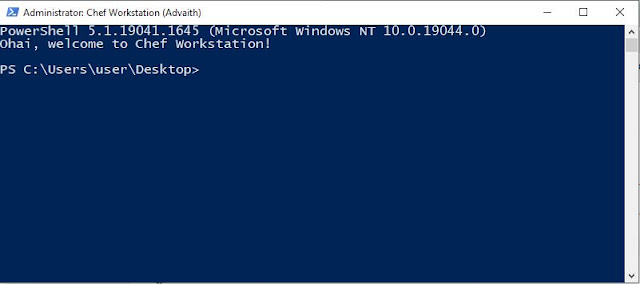
Go to Chef-repo location in power shell with the below command
cd G:\DEVOPS\Chef\chef-starter\chef-repo
Able to see all the files in that location:
Attaching a Node1 to chef server with the below command
knife bootstrap <Node IP> -U root -P <Password> -N Node-1
eg: knife bootstrap 192.168.2.128 -U root -P root123 -N Node-1
If you get this error first time use this command for the first command :
PS G:\DEVOPS\chef-starter\chef-repo> knife bootstrap 192.168.2.133 -U root -P root123 -N Node-1ERROR: LicenseAcceptance::LicenseNotAcceptedError: Missing licenses for the following: * infra-client * inspec
PS G:\DEVOPS\chef-starter\chef-repo> knife bootstrap 192.168.2.133 -U root -P root123 -N Node-1 --chef-license accept
In check server it will see as below once it is added. 
Copy starter KIT: /opt/chef/chef-starter
[root@localhost chef-repo]# cd /opt/chef/chef-starter/chef-repo[root@localhost chef-repo]# ls -ltrtotal 4-rw-r--r--. 1 root root 2284 May 5 20:30 README.mddrwxr-xr-x. 3 root root 39 May 6 09:21 cookbooksdrwxr-xr-x. 2 root root 24 May 6 09:21 roles[root@localhost chef-repo]#
Linux :Attaching a Node2 to chef server with the below command
knife bootstrap 192.168.2.128 -U root -P root123 -N Node-2
[root@localhost chef-repo]# knife bootstrap 192.168.2.128 -U root -P root123 -N Node-2Connecting to 192.168.2.128 using sshThe authenticity of host '192.168.2.128 ()' can't be established.fingerprint is SHA256:q6hSYNAHX0pnhNlKYb5fgP0eQoU4QmX3pRsory0fZcQ.
Are you sure you want to continue connecting? (Y/N) YConnecting to 192.168.2.128 using sshCreating new client for Node-2Creating new node for Node-2Bootstrapping 192.168.2.128 [192.168.2.128] -----> Existing Chef Infra Client installation detected [192.168.2.128] Starting the first Chef Infra Client Client run... [192.168.2.128] Chef Infra Client, version 17.10.3Patents: https://www.chef.io/patentsInfra Phase starting [192.168.2.128] Resolving cookbooks for run list: [] [192.168.2.128] Synchronizing cookbooks: [192.168.2.128] Installing cookbook gem dependencies:Compiling cookbooks... [192.168.2.128] Loading Chef InSpec profile files:Loading Chef InSpec input files:Loading Chef InSpec waiver files:[2022-05-06T09:26:35+05:30] WARN: Node Node-2 has an empty run list. [192.168.2.128] Converging 0 resources [192.168.2.128]Running handlers:Running handlers completeInfra Phase complete, 0/0 resources updated in 24 seconds[root@localhost chef-repo]#[root@localhost chef-repo]#
Check in Chef server, Node2 will be added : 
------------------------------------------Thanks-------------------------------------------------
3). Worker Nodes.
Windows:

Go to Chef-repo location in power shell with the below command
cd G:\DEVOPS\Chef\chef-starter\chef-repo

Able to see all the files in that location:
Attaching a Node1 to chef server with the below command
knife bootstrap <Node IP> -U root -P <Password> -N Node-1
eg: knife bootstrap 192.168.2.128 -U root -P root123 -N Node-1

If you get this error first time use this command for the first command :
PS G:\DEVOPS\chef-starter\chef-repo> knife bootstrap 192.168.2.133 -U root -P root123 -N Node-1
ERROR: LicenseAcceptance::LicenseNotAcceptedError: Missing licenses for the following:
* infra-client
* inspec
PS G:\DEVOPS\chef-starter\chef-repo> knife bootstrap 192.168.2.133 -U root -P root123 -N Node-1 --chef-license accept
In check server it will see as below once it is added.

Copy starter KIT: /opt/chef/chef-starter
[root@localhost chef-repo]# cd /opt/chef/chef-starter/chef-repo
[root@localhost chef-repo]# ls -ltr
total 4
-rw-r--r--. 1 root root 2284 May 5 20:30 README.md
drwxr-xr-x. 3 root root 39 May 6 09:21 cookbooks
drwxr-xr-x. 2 root root 24 May 6 09:21 roles
[root@localhost chef-repo]#
Linux :
Attaching a Node2 to chef server with the below command
knife bootstrap 192.168.2.128 -U root -P root123 -N Node-2
[root@localhost chef-repo]# knife bootstrap 192.168.2.128 -U root -P root123 -N Node-2
Connecting to 192.168.2.128 using ssh
The authenticity of host '192.168.2.128 ()' can't be established.
fingerprint is SHA256:q6hSYNAHX0pnhNlKYb5fgP0eQoU4QmX3pRsory0fZcQ.
Are you sure you want to continue connecting
? (Y/N) Y
Connecting to 192.168.2.128 using ssh
Creating new client for Node-2
Creating new node for Node-2
Bootstrapping 192.168.2.128
[192.168.2.128] -----> Existing Chef Infra Client installation detected
[192.168.2.128] Starting the first Chef Infra Client Client run...
[192.168.2.128] Chef Infra Client, version 17.10.3
Patents: https://www.chef.io/patents
Infra Phase starting
[192.168.2.128] Resolving cookbooks for run list: []
[192.168.2.128] Synchronizing cookbooks:
[192.168.2.128] Installing cookbook gem dependencies:
Compiling cookbooks...
[192.168.2.128] Loading Chef InSpec profile files:
Loading Chef InSpec input files:
Loading Chef InSpec waiver files:
[2022-05-06T09:26:35+05:30] WARN: Node Node-2 has an empty run list.
[192.168.2.128] Converging 0 resources
[192.168.2.128]
Running handlers:
Running handlers complete
Infra Phase complete, 0/0 resources updated in 24 seconds
[root@localhost chef-repo]#
[root@localhost chef-repo]#
Check in Chef server, Node2 will be added :

------------------------------------------Thanks-------------------------------------------------


Comments
Post a Comment