DOCKER
Docker : Virtualization splitting one server into many logical servers with in the limit of server capacity.
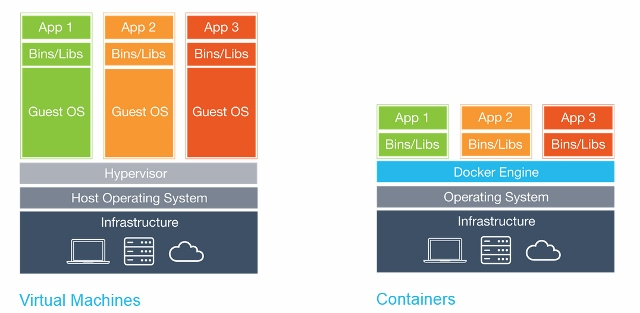
Difference between Virtual Machines and Docker Containers (Source: Docker) This makes containers much smaller, faster, and more efficient. While a VM can take about a minute to spin up and can weigh several Gigabytes, a container weighs, on average, 400 to 600mb (the biggest ones). They also take only seconds to spin up. This is mostly because they don't have to spin a whole operating system before running the process.
They also take only seconds to spin up. This is mostly because they don't have to spin a whole operating system before running the process.
DOCKER Installation
Using username "root".
Last login: Wed May 18 16:12:16 2022 from 192.168.2.1
[root@chef-workstation ~]# curl -fsSL https://get.docker.com -o get-docker.sh
[root@chef-workstation ~]# sh get-docker.sh
# Executing docker install script, commit: 614d05e0e669a0577500d055677bb6f71e822356
+ sh -c 'yum install -y -q yum-utils'
Delta RPMs disabled because /usr/bin/applydeltarpm not installed.
Warning: RPMDB altered outside of yum.
+ sh -c 'yum-config-manager --add-repo https://download.docker.com/linux/centos/docker-ce.repo'
Loaded plugins: fastestmirror
adding repo from: https://download.docker.com/linux/centos/docker-ce.repo
grabbing file https://download.docker.com/linux/centos/docker-ce.repo to /etc/yum.repos.d/docker-ce.repo
repo saved to /etc/yum.repos.d/docker-ce.repo
+ '[' stable '!=' stable ']'
+ sh -c 'yum makecache'
Loaded plugins: fastestmirror
Loading mirror speeds from cached hostfile
* base: centos.excellmedia.net
* extras: centos.excellmedia.net
* updates: centos.excellmedia.net
base | 3.6 kB 00:00:00
docker-ce-stable | 3.5 kB 00:00:00
extras | 2.9 kB 00:00:00
jenkins | 2.9 kB 00:00:00
updates | 2.9 kB 00:00:00
(1/12): docker-ce-stable/7/x86_64/filelists_db | 32 kB 00:00:00
(2/12): docker-ce-stable/7/x86_64/updateinfo | 55 B 00:00:00
(3/12): docker-ce-stable/7/x86_64/primary_db | 78 kB 00:00:00
(4/12): docker-ce-stable/7/x86_64/other_db | 124 kB 00:00:00
(5/12): base/7/x86_64/other_db | 2.6 MB 00:00:01
(6/12): extras/7/x86_64/other_db | 148 kB 00:00:00
(7/12): extras/7/x86_64/filelists_db | 277 kB 00:00:00
(8/12): jenkins/filelists_db | 26 kB 00:00:01
(9/12): jenkins/other_db | 41 kB 00:00:01
(10/12): updates/7/x86_64/filelists_db | 8.4 MB 00:00:03
(11/12): base/7/x86_64/filelists_db | 7.2 MB 00:00:05
(12/12): updates/7/x86_64/other_db | 1.0 MB 00:00:52
Metadata Cache Created
+ sh -c 'yum install -y -q docker-ce docker-ce-cli containerd.io docker-scan-plugin docker-compose-plugin docker-ce-rootless-extras'
warning: /var/cache/yum/x86_64/7/docker-ce-stable/packages/docker-ce-20.10.16-3.el7.x86_64.rpm: Header V4 RSA/SHA512 Signature, key ID 621e9f35: NOKEY
Public key for docker-ce-20.10.16-3.el7.x86_64.rpm is not installed
Importing GPG key 0x621E9F35:
Userid : "Docker Release (CE rpm) <docker@docker.com>"
Fingerprint: 060a 61c5 1b55 8a7f 742b 77aa c52f eb6b 621e 9f35
From : https://download.docker.com/linux/centos/gpg
================================================================================
To run Docker as a non-privileged user, consider setting up the
Docker daemon in rootless mode for your user:
dockerd-rootless-setuptool.sh install
Visit https://docs.docker.com/go/rootless/ to learn about rootless mode.
To run the Docker daemon as a fully privileged service, but granting non-root
users access, refer to https://docs.docker.com/go/daemon-access/
WARNING: Access to the remote API on a privileged Docker daemon is equivalent
to root access on the host. Refer to the 'Docker daemon attack surface'
documentation for details: https://docs.docker.com/go/attack-surface/
================================================================================
[root@chef-workstation ~]# docker --version
Docker version 20.10.16, build aa7e414
systemctl enable docker -> this will enables in booting process to start docker services.
[root@chef-workstation ~]# systemctl enable docker
Created symlink from /etc/systemd/system/multi-user.target.wants/docker.service to /usr/lib/systemd/system/docker.service.
[root@chef-workstation ~]#
Docker Commands
systemctl status docker --> status of the docker services.
systemctl start docker --> starting the docker services.
systemctl start docker --> stopping the docker services.
docker ps --> listing the container which are running currently.
docker ps -a --> listing all the containers including which are not running also.
docker images --> it will display all the images.
docker pull <<image_name>> --> it will download the image to local.
docker run -it <<image_name>> --> it will create the container.
ctrl+p+q --> It will come out from container without shut down the container.
[root@chef-workstation ~]# systemctl status docker
● docker.service - Docker Application Container Engine
Loaded: loaded (/usr/lib/systemd/system/docker.service; enabled; vendor preset: disabled)
Active: inactive (dead)
Docs: https://docs.docker.com
[root@chef-workstation ~]# systemctl start docker
[root@chef-workstation ~]# docker images
REPOSITORY TAG IMAGE ID CREATED SIZE
[root@chef-workstation ~]# docker ps
CONTAINER ID IMAGE COMMAND CREATED STATUS PORTS NAMES
[root@chef-workstation ~]#
- docker pull <<image_name>> --> it will download the image to local.
[root@chef-workstation ~]# docker pull ubuntu
Using default tag: latest
latest: Pulling from library/ubuntu
125a6e411906: Pull complete
Digest: sha256:26c68657ccce2cb0a31b330cb0be2b5e108d467f641c62e13ab40cbec258c68d
Status: Downloaded newer image for ubuntu:latest
docker.io/library/ubuntu:latest
[root@chef-workstation ~]#
root@a8a79b036835:/# apt-get update -y
Get:1 http://archive.ubuntu.com/ubuntu jammy InRelease [270 kB]
Get:2 http://security.ubuntu.com/ubuntu jammy-security InRelease [110 kB]
Get:3 http://archive.ubuntu.com/ubuntu jammy-updates InRelease [109 kB]
Get:4 http://archive.ubuntu.com/ubuntu jammy-backports InRelease [90.7 kB]
Get:5 http://archive.ubuntu.com/ubuntu jammy/universe amd64 Packages [17.5 MB]
Get:6 http://security.ubuntu.com/ubuntu jammy-security/universe amd64 Packages [64.3 kB]
Get:7 http://security.ubuntu.com/ubuntu jammy-security/restricted amd64 Packages [132 kB]
Get:8 http://archive.ubuntu.com/ubuntu jammy/main amd64 Packages [1792 kB]
Get:9 http://archive.ubuntu.com/ubuntu jammy/multiverse amd64 Packages [266 kB]
Get:10 http://archive.ubuntu.com/ubuntu jammy/restricted amd64 Packages [164 kB]
Get:11 http://archive.ubuntu.com/ubuntu jammy-updates/multiverse amd64 Packages [4653 B]
Get:12 http://archive.ubuntu.com/ubuntu jammy-updates/main amd64 Packages [192 kB]
Get:13 http://archive.ubuntu.com/ubuntu jammy-updates/restricted amd64 Packages [132 kB]
Get:14 http://archive.ubuntu.com/ubuntu jammy-updates/universe amd64 Packages [106 kB]
Get:15 http://security.ubuntu.com/ubuntu jammy-security/multiverse amd64 Packages [4653 B]
Get:16 http://security.ubuntu.com/ubuntu jammy-security/main amd64 Packages [97.8 kB]
Fetched 21.0 MB in 5s (3904 kB/s)
Reading package lists... Done
root@a8a79b036835:/#
- apt-get install git -y --> GIT installation on ubuntu image
root@a8a79b036835:/# apt-get install git -y
Reading package lists... Done
Building dependency tree... Done
Reading state information... Done
The following additional packages will be installed:
ca-certificates git-man less libbrotli1 libbsd0 libcbor0.8 libcurl3-gnutls libedit2 liberror-perl libexpat1 libfido2-1
libgdbm-compat4 libgdbm6 libldap-2.5-0 libldap-common libmd0 libnghttp2-14 libperl5.34 libpsl5 librtmp1 libsasl2-2 libsasl2-modules
libsasl2-modules-db libssh-4 libssl3 libx11-6 libx11-data libxau6 libxcb1 libxdmcp6 libxext6 libxmuu1 netbase openssh-client
openssl patch perl perl-modules-5.34 publicsuffix xauth
Suggested packages:
gettext-base git-daemon-run | git-daemon-sysvinit git-doc git-email git-gui gitk gitweb git-cvs git-mediawiki git-svn gdbm-l10n
libsasl2-modules-gssapi-mit | libsasl2-modules-gssapi-heimdal libsasl2-modules-ldap libsasl2-modules-otp libsasl2-modules-sql
keychain libpam-ssh monkeysphere ssh-askpass ed diffutils-doc perl-doc libterm-readline-gnu-perl | libterm-readline-perl-perl make
libtap-harness-archive-perl
The following NEW packages will be installed:
ca-certificates git git-man less libbrotli1 libbsd0 libcbor0.8 libcurl3-gnutls libedit2 liberror-perl libexpat1 libfido2-1
libgdbm-compat4 libgdbm6 libldap-2.5-0 libldap-common libmd0 libnghttp2-14 libperl5.34 libpsl5 librtmp1 libsasl2-2 libsasl2-modules
libsasl2-modules-db libssh-4 libx11-6 libx11-data libxau6 libxcb1 libxdmcp6 libxext6 libxmuu1 netbase openssh-client openssl patch
perl perl-modules-5.34 publicsuffix xauth
The following packages will be upgraded:
libssl3
1 upgraded, 40 newly installed, 0 to remove and 3 not upgraded.
Need to get 19.3 MB of archives.
After this operation, 84.2 MB of additional disk space will be used.
Get:1 http://archive.ubuntu.com/ubuntu jammy/main amd64 perl-modules-5.34 all 5.34.0-3ubuntu1 [2975 kB]
Get:2 http://archive.ubuntu.com/ubuntu jammy/main amd64 libgdbm6 amd64 1.23-1 [33.9 kB]
Get:3 http://archive.ubuntu.com/ubuntu jammy/main amd64 libgdbm-compat4 amd64 1.23-1 [6606 B]
Get:4 http://archive.ubuntu.com/ubuntu jammy/main amd64 libperl5.34 amd64 5.34.0-3ubuntu1 [4809 kB]
Get:5 http://archive.ubuntu.com/ubuntu jammy/main amd64 perl amd64 5.34.0-3ubuntu1 [232 kB]
Get:6 http://archive.ubuntu.com/ubuntu jammy-updates/main amd64 libssl3 amd64 3.0.2-0ubuntu1.2 [1900 kB]
Get:7 http://archive.ubuntu.com/ubuntu jammy-updates/main amd64 openssl amd64 3.0.2-0ubuntu1.2 [1183 kB]
Get:8 http://archive.ubuntu.com/ubuntu jammy/main amd64 ca-certificates all 20211016 [148 kB]
Get:9 http://archive.ubuntu.com/ubuntu jammy/main amd64 less amd64 590-1build1 [143 kB]
Get:10 http://archive.ubuntu.com/ubuntu jammy/main amd64 libmd0 amd64 1.0.4-1build1 [23.0 kB]
Get:11 http://archive.ubuntu.com/ubuntu jammy/main amd64 libbsd0 amd64 0.11.5-1 [44.8 kB]
Get:12 http://archive.ubuntu.com/ubuntu jammy/main amd64 libexpat1 amd64 2.4.7-1 [90.7 kB]
Get:13 http://archive.ubuntu.com/ubuntu jammy/main amd64 netbase all 6.3 [12.9 kB]
Get:14 http://archive.ubuntu.com/ubuntu jammy/main amd64 libcbor0.8 amd64 0.8.0-2ubuntu1 [24.6 kB]
Selecting previously unselected package libx11-data.
Preparing to unpack .../15-libx11-data_2%3a1.7.5-1_all.deb ...
Unpacking libx11-data (2:1.7.5-1) ...
Selecting previously unselected package libx11-6:amd64.
Preparing to unpack .../16-libx11-6_2%3a1.7.5-1_amd64.deb ...
Unpacking libx11-6:amd64 (2:1.7.5-1) ...
Selecting previously unselected package libxext6:amd64.
Preparing to unpack .../17-libxext6_2%3a1.3.4-1build1_amd64.deb ...
Unpacking libxext6:amd64 (2:1.3.4-1build1) ...
Selecting previously unselected package libxmuu1:amd64.
Preparing to unpack .../18-libxmuu1_2%3a1.1.3-3_amd64.deb ...
Unpacking libxmuu1:amd64 (2:1.1.3-3) ...
Selecting previously unselected package openssh-client.
Preparing to unpack .../19-openssh-client_1%3a8.9p1-3_amd64.deb ...
Unpacking openssh-client (1:8.9p1-3) ...
Selecting previously unselected package publicsuffix.
Preparing to unpack .../20-publicsuffix_20211207.1025-1_all.deb ...
Unpacking publicsuffix (20211207.1025-1) ...
Selecting previously unselected package xauth.
Preparing to unpack .../21-xauth_1%3a1.1-1build2_amd64.deb ...
Unpacking xauth (1:1.1-1build2) ...
Selecting previously unselected package libbrotli1:amd64.
Preparing to unpack .../22-libbrotli1_1.0.9-2build6_amd64.deb ...
Unpacking libbrotli1:amd64 (1.0.9-2build6) ...
Selecting previously unselected package libsasl2-modules-db:amd64.
Preparing to unpack .../23-libsasl2-modules-db_2.1.27+dfsg2-3ubuntu1_amd64.deb ...
Unpacking libsasl2-modules-db:amd64 (2.1.27+dfsg2-3ubuntu1) ...
Selecting previously unselected package libsasl2-2:amd64.
Preparing to unpack .../24-libsasl2-2_2.1.27+dfsg2-3ubuntu1_amd64.deb ...
Unpacking libsasl2-2:amd64 (2.1.27+dfsg2-3ubuntu1) ...
Selecting previously unselected package libldap-2.5-0:amd64.
Preparing to unpack .../25-libldap-2.5-0_2.5.11+dfsg-1~exp1ubuntu3.1_amd64.deb ...
Unpacking libldap-2.5-0:amd64 (2.5.11+dfsg-1~exp1ubuntu3.1) ...
Selecting previously unselected package librtmp1:amd64.
Preparing to unpack .../26-librtmp1_2.4+20151223.gitfa8646d.1-2build4_amd64.deb ...
Unpacking librtmp1:amd64 (2.4+20151223.gitfa8646d.1-2build4) ..
Preparing to unpack .../34-patch_2.7.6-7build2_amd64.deb ...
Unpacking patch (2.7.6-7build2) ...
Setting up libexpat1:amd64 (2.4.7-1) ...
Setting up libxau6:amd64 (1:1.0.9-1build5) ...
Setting up libpsl5:amd64 (0.21.0-1.2build2) ...
Setting up libcbor0.8:amd64 (0.8.0-2ubuntu1) ...
Setting up libbrotli1:amd64 (1.0.9-2build6) ...
Setting up libsasl2-modules:amd64 (2.1.27+dfsg2-3ubuntu1) ...
Setting up libnghttp2-14:amd64 (1.43.0-1build3) ...
Setting up less (590-1build1) ...
Setting up perl-modules-5.34 (5.34.0-3ubuntu1) ...
Setting up libldap-common (2.5.11+dfsg-1~exp1ubuntu3.1) ...
Setting up libsasl2-modules-db:amd64 (2.1.27+dfsg2-3ubuntu1) ...
Setting up libx11-data (2:1.7.5-1) ...
Setting up librtmp1:amd64 (2.4+20151223.gitfa8646d.1-2build4) ...
Setting up patch (2.7.6-7build2) ...
Setting up libsasl2-2:amd64 (2.1.27+dfsg2-3ubuntu1) ...
Setting up libssh-4:amd64 (0.9.6-2build1) ...
Setting up libmd0:amd64 (1.0.4-1build1) ...
Setting up git-man (1:2.34.1-1ubuntu1.2) ...
Setting up netbase (6.3) ...
Setting up libfido2-1:amd64 (1.10.0-1) ...
Setting up openssl (3.0.2-0ubuntu1.2) ...
Setting up libbsd0:amd64 (0.11.5-1) ...
Setting up publicsuffix (20211207.1025-1) ...
Setting up libgdbm6:amd64 (1.23-1) ...
Setting up libxdmcp6:amd64 (1:1.1.3-0ubuntu5) ...
Setting up libxcb1:amd64 (1.14-3ubuntu3) ...
Setting up libedit2:amd64 (3.1-20210910-1build1) ...
Setting up libldap-2.5-0:amd64 (2.5.11+dfsg-1~exp1ubuntu3.1) ...
Setting up ca-certificates (20211016) ...
debconf: unable to initialize frontend: Dialog
debconf: (No usable dialog-like program is installed, so the dialog based frontend cannot be used. at /usr/share/perl5/Debconf/FrontEnd/Dialog.pm line 78.)
debconf: falling back to frontend: Readline
Setting up libperl5.34:amd64 (5.34.0-3ubuntu1) ...
Setting up openssh-client (1:8.9p1-3) ...
update-alternatives: using /usr/bin/ssh to provide /usr/bin/rsh (rsh) in auto mode
update-alternatives: warning: skip creation of /usr/share/man/man1/rsh.1.gz because associated file /usr/share/man/man1/ssh.1.gz (of link group rsh) doesn't exist
update-alternatives: using /usr/bin/slogin to provide /usr/bin/rlogin (rlogin) in auto mode
update-alternatives: warning: skip creation of /usr/share/man/man1/rlogin.1.gz because associated file /usr/share/man/man1/slogin.1.gz (of link group rlogin) doesn't exist
update-alternatives: using /usr/bin/scp to provide /usr/bin/rcp (rcp) in auto mode
update-alternatives: warning: skip creation of /usr/share/man/man1/rcp.1.gz because associated file /usr/share/man/man1/scp.1.gz (of link group rcp) doesn't exist
Setting up libxext6:amd64 (2:1.3.4-1build1) ...
Setting up libcurl3-gnutls:amd64 (7.81.0-1ubuntu1.2) ...
Setting up perl (5.34.0-3ubuntu1) ...
Setting up xauth (1:1.1-1build2) ...
Setting up liberror-perl (0.17029-1) ...
Setting up git (1:2.34.1-1ubuntu1.2) ...
Processing triggers for libc-bin (2.35-0ubuntu3) ...
Processing triggers for ca-certificates (20211016) ...
Updating certificates in /etc/ssl/certs...
0 added, 0 removed; done.
Running hooks in /etc/ca-certificates/update.d...
done.
root@a8a79b036835:/# git
usage: git [--version] [--help] [-C <path>] [-c <name>=<value>]
[--exec-path[=<path>]] [--html-path] [--man-path] [--info-path]
[-p | --paginate | -P | --no-pager] [--no-replace-objects] [--bare]
[--git-dir=<path>] [--work-tree=<path>] [--namespace=<name>]
[--super-prefix=<path>] [--config-env=<name>=<envvar>]
<command> [<args>]
These are common Git commands used in various situations:
start a working area (see also: git help tutorial)
clone Clone a repository into a new directory
init Create an empty Git repository or reinitialize an existing one
work on the current change (see also: git help everyday)
add Add file contents to the index
mv Move or rename a file, a directory, or a symlink
restore Restore working tree files
rm Remove files from the working tree and from the index
examine the history and state (see also: git help revisions)
bisect Use binary search to find the commit that introduced a bug
diff Show changes between commits, commit and working tree, etc
grep Print lines matching a pattern
log Show commit logs
show Show various types of objects
status Show the working tree status
grow, mark and tweak your common history
branch List, create, or delete branches
commit Record changes to the repository
merge Join two or more development histories together
rebase Reapply commits on top of another base tip
reset Reset current HEAD to the specified state
switch Switch branches
tag Create, list, delete or verify a tag object signed with GPG
collaborate (see also: git help workflows)
fetch Download objects and refs from another repository
pull Fetch from and integrate with another repository or a local branch
push Update remote refs along with associated objects
'git help -a' and 'git help -g' list available subcommands and some
concept guides. See 'git help <command>' or 'git help <concept>'
to read about a specific subcommand or concept.
See 'git help git' for an overview of the system.
root@a8a79b036835:/# git --version
git version 2.34.1
- apt-get remove git -y --> GIT uninstallation on ubuntu image
root@a8a79b036835:/# apt-get remove git -y
Reading package lists... Done
Building dependency tree... Done
Reading state information... Done
The following packages were automatically installed and are no longer required:
git-man less libbrotli1 libbsd0 libcbor0.8 libcurl3-gnutls libedit2 liberror-perl libexpat1 libfido2-1 libgdbm-compat4 libgdbm6
libldap-2.5-0 libldap-common libmd0 libnghttp2-14 libperl5.34 libpsl5 librtmp1 libsasl2-2 libsasl2-modules libsasl2-modules-db
libssh-4 libx11-6 libx11-data libxau6 libxcb1 libxdmcp6 libxext6 libxmuu1 netbase openssh-client patch perl perl-modules-5.34
publicsuffix xauth
Use 'apt autoremove' to remove them.
The following packages will be REMOVED:
git
0 upgraded, 0 newly installed, 1 to remove and 3 not upgraded.
After this operation, 18.8 MB disk space will be freed.
(Reading database ... 8352 files and directories currently installed.)
Removing git (1:2.34.1-1ubuntu1.2) ...
root@a8a79b036835:/#
- exit --> It will shutdown the container and then it will come out.
root@a8a79b036835:/# exit
exit
[root@chef-workstation ~]#
- docker ps --> listing the container which are running currently.
[root@chef-workstation ~]# docker ps
CONTAINER ID IMAGE COMMAND CREATED STATUS PORTS NAMES
- docker ps -a --> listing all the containers including which are not running also.
[root@chef-workstation ~]# docker ps -a
CONTAINER ID IMAGE COMMAND CREATED STATUS PORTS NAMES
a8a79b036835 ubuntu "bash" 9 minutes ago Exited (0) 12 seconds ago dreamy_dubinsky
[root@chef-workstation ~]#
- docker images --> listing all the images
[root@chef-workstation ~]# docker images
REPOSITORY TAG IMAGE ID CREATED SIZE
ubuntu latest d2e4e1f51132 2 weeks ago 77.8MB
[root@chef-workstation ~]#
- docker run -it centos --> It will create the container, it will connected to container

[root@devops ~]# docker run -itd centos
8e16c8168527d70375751be6502bdb3827158155919fcceb34e462183cc00a06
[ o
[root@devops ~]# docker ps
CONTAINER ID IMAGE COMMAND CREATED STATUS PORTS NAMES
8e16c8168527 centos "/bin/bash" 13 seconds ago Up 12 seconds gallant_saha
eba16896873b ubuntu "bash" 6 minutes ago Up 6 minutes friendly_solomon
[root@devops ~]#

[root@chef-workstation ~]# docker attach c4513c655044
[root@c4513c655044 /]#
[root@c4513c655044 /]# exit
exit
[root@chef-workstation ~]# docker ps -a
CONTAINER ID IMAGE COMMAND CREATED STATUS PORTS NAMES
c4513c655044 centos "/bin/bash" 50 seconds ago Exited (0) 1 second ago agitated_banach
a8a79b036835 ubuntu "bash" 14 minutes ago Up 2 minutes dreamy_dubinsky

[root@chef-workstation ~]# docker start c4513c655044
c4513c655044
[root@chef-workstation ~]# docker exec -it c4513c655044 /bin/bash
[root@c4513c655044 /]#
[root@c4513c655044 /]# exit
exit
[root@chef-workstation ~]# docker ps -a
CONTAINER ID IMAGE COMMAND CREATED STATUS PORTS NAMES
c4513c655044 centos "/bin/bash" 2 minutes ago Up 10 seconds agitated_banach
a8a79b036835 ubuntu "bash" 16 minutes ago Up 4 minutes dreamy_dubinsky
[root@chef-workstation ~]#

- docker tag <<CON_ID>> << TAG_NAME >>

- docker rm <<cont_ID>> - It will delete the container, when it is not running
- docker rm -f <<cont_ID>> - It will delete the container, when it is running also
- docker ps -aq --> list of container ID's
- docker rm -f $(docker ps -qa) - It will delete the all containers.
- docker rmi <<Image_ID>> --> It will delete the Image.
- Configure docker hub account : https://docs.docker.com/
Using docker file -> create file , git installation, git configuration
- Example 2:


- docker cp file_name Container_id:/location
- docker cp dir_name Container_id:/location


- docker run -it -v Host_folder:container_folder centos


Sharing between container to container :


Comments
Post a Comment